
September 16, 2026
Lapbook Templates: Size and Print-Scale Reference
Compare calculated outer dimensions for seven Lapbook.net components at custom scales and Letter-to-A4 settings, with formulas, data and limitations.
Data version 1 · Guide revision 1 · 16 September 2026 · Prepared for Lapbook.net
Use this reference to estimate how the outer dimensions of seven Lapbook.net components change with print scaling. It contains digital calculations, not physical print-test results. The measurements apply to geometry version 1.0.0; they do not describe every lapbook template or guarantee that a finished pocket will hold a particular card.
The table measures the rectangle around the unassembled cut line. For the wheel, width and height equal its outer diameter. For cards, the figures describe the whole multi-card block, not one card. The reference supplies measurements and calculation data; it is not a downloadable template collection.
Find the component you are measuring
Choose a component name below to see its measured boundary and exact source location. These are Lapbook.net geometry 1.0.0 components, not standard sizes for all lapbook templates. One PDF point is 25.4/72 mm. The figures show outer bounds; screen zoom does not set a physical print size.
trifold — 468 × 360 pt
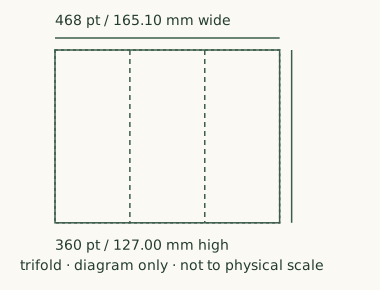
At 100%: 165.10 × 127.00 mm. Geometry 1.0.0.
Source location: /components/trifold in the original geometry file. Use the same component ID in the results CSV.
Both dimensions cover the unassembled outer boundary, not the finished folded piece.
Digital schematic only. Internal activity content and variable subdivisions are omitted; use the original pack instructions for cutting, folding and assembly.
flapbook — 468 × 360 pt
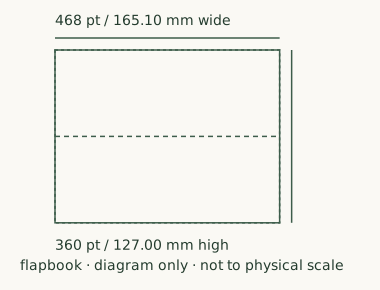
At 100%: 165.10 × 127.00 mm. Geometry 1.0.0.
Source location: /components/flapbook in the original geometry file. Use the same component ID in the results CSV.
Both dimensions cover the unassembled outer boundary, not the finished folded piece.
Digital schematic only. Internal activity content and variable subdivisions are omitted; use the original pack instructions for cutting, folding and assembly.
wheel — 336 × 336 pt
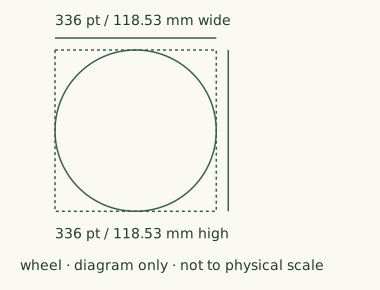
At 100%: 118.53 × 118.53 mm. Geometry 1.0.0.
Source location: /components/wheel in the original geometry file. Use the same component ID in the results CSV.
Width and height are the outer diameter, not a circumference.
Digital schematic only. Internal activity content and variable subdivisions are omitted; use the original pack instructions for cutting, folding and assembly.
pocket — 420 × 300 pt
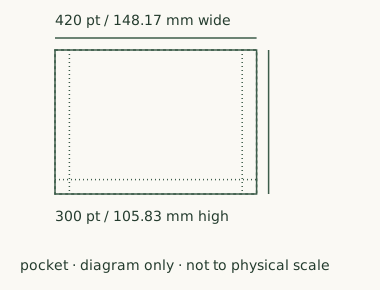
At 100%: 148.17 × 105.83 mm. Geometry 1.0.0.
Source location: /components/pocket in the original geometry file. Use the same component ID in the results CSV.
Both dimensions cover the unassembled outer boundary, not the finished folded piece.
Digital schematic only. Internal activity content and variable subdivisions are omitted; use the original pack instructions for cutting, folding and assembly.
cards — 468 × 396 pt
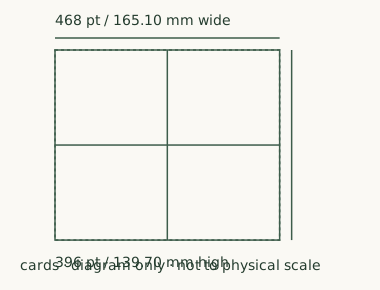
At 100%: 165.10 × 139.70 mm. Geometry 1.0.0.
Source location: /components/cards in the original geometry file. Use the same component ID in the results CSV.
Both dimensions cover the entire 2 × 2 card block, not an individual card.
Digital schematic only. Internal activity content and variable subdivisions are omitted; use the original pack instructions for cutting, folding and assembly.
matchbook — 468 × 330 pt
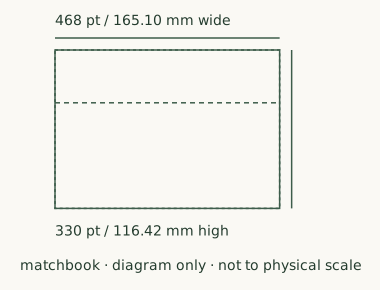
At 100%: 165.10 × 116.42 mm. Geometry 1.0.0.
Source location: /components/matchbook in the original geometry file. Use the same component ID in the results CSV.
Both dimensions cover the unassembled outer boundary, not the finished folded piece.
Digital schematic only. Internal activity content and variable subdivisions are omitted; use the original pack instructions for cutting, folding and assembly.
sequence — 468 × 380 pt
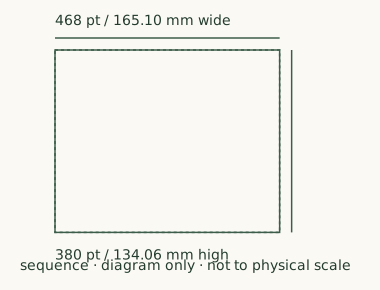
At 100%: 165.10 × 134.06 mm. Geometry 1.0.0.
Source location: /components/sequence in the original geometry file. Use the same component ID in the results CSV.
Both dimensions cover the unassembled outer boundary, not the finished folded piece.
Digital schematic only. Internal activity content and variable subdivisions are omitted; use the original pack instructions for cutting, folding and assembly.
The diagram’s solid outer line is the measured boundary; dashed internal lines show fixed fold positions, and dotted internal lines show glue guides where present. The wheel’s dashed rectangle is its bounding box. These are digital schematics, not photographs or assembly templates. Component-to-source map.
What changes at 80% scale?
A linear scale affects both width and height. In this model, the trifold bounding box changes from 165.10 × 127.00 mm at 100% to 132.08 × 101.60 mm at 80%. Its bounding-box area becomes 0.8 × 0.8 = 64% of the original area. This describes geometry, not usable writing area after folding.
Calculated outer width × height, in millimeters
On a small screen, scroll the table sideways to compare all four settings.
| Component | 100% | 95% | 80% | 50% |
|---|---|---|---|---|
| trifold | 165.10 × 127.00 | 156.84 × 120.65 | 132.08 × 101.60 | 82.55 × 63.50 |
| flapbook | 165.10 × 127.00 | 156.84 × 120.65 | 132.08 × 101.60 | 82.55 × 63.50 |
| wheel | 118.53 × 118.53 | 112.61 × 112.61 | 94.83 × 94.83 | 59.27 × 59.27 |
| 148.17 × 105.83 | 140.76 × 100.54 | 118.53 × 84.67 | 74.08 × 52.92 | |
| cards | 165.10 × 139.70 | 156.84 × 132.72 | 132.08 × 111.76 | 82.55 × 69.85 |
| matchbook | 165.10 × 116.42 | 156.84 × 110.60 | 132.08 × 93.13 | 82.55 × 58.21 |
| sequence | 165.10 × 134.06 | 156.84 × 127.35 | 132.08 × 107.24 | 82.55 × 67.03 |
Dimensions are rounded to two decimals here. The CSV retains additional precision. These four scenarios use a centered US Letter source and target with a modeled 5 mm margin; the displayed dimensions do not depend on that margin, but clipping checks do.
What does the Letter-to-A4 model calculate?
The source page is 215.9 × 279.4 mm. A4 is modeled as 210 × 297 mm. With equal 5 mm margins, its printable rectangle is 200 × 287 mm. The Fit scale is:
min(200 / 215.9, 287 / 279.4) = 0.926354794
That is 92.635479% linear scale, not 100%. All seven modeled cut-line bounding boxes remain inside this printable rectangle at that setting. This does not check every text label, document element or printer driver.
| A4 scenario | Linear scale | Modeled cut-line bounds crossing printable rectangle |
|---|---|---|
| Fit, 0 mm margin (theoretical) | 97.267253% | 0 of 7 |
| Fit, 5 mm margin | 92.635479% | 0 of 7 |
| Fit, 10 mm margin | 88.003705% | 0 of 7 |
| Actual size, 5 mm margin | 100.000000% | 0 of 7 |
| Actual size, 30 mm margin (stress case) | 100.000000% | 5 of 7 |
The 0 mm scenario is not evidence that a printer supports borderless printing. The 30 mm scenario deliberately tests an unusually restricted printable rectangle. Actual size retaining these cut-line boxes at 5 mm does not guarantee that all page content survives printing.
Choose the print setting
Official software background, checked 16 September 2026: Adobe’s scaling instructions distinguish entering a Custom Scale percentage from automatically fitting a page to the selected paper. Fit can enlarge a small page as well as reduce a large one; “Shrink oversized pages” is a different option. These instructions describe Acrobat/Reader options, not tests of our components.
- Actual size / 100%: our model uses a scale factor of 1, retaining the source dimensions. This does not create a larger printable area; content outside it can still be lost.
- Custom Scale: choose a percentage when the target component dimension matters. At 80%, both width and height become 80%; area becomes 64%, a 36% reduction in bounding-box area.
- Fit: choose this when adapting the whole PDF page to the available paper area matters more than preserving a chosen component size. Our A4 table models the smaller of the horizontal and vertical scale factors. It is not a prediction of every printer’s Fit result.
Check that the selected paper size matches the paper loaded in the printer. Paper size is the sheet’s outside boundary; printable area is the region the selected printer/settings can address. The equal 5 mm margin in this study is an assumption, not a measurement of your printer. A page with asymmetric margins, rotation, cropping or multiple pages per sheet falls outside this model. Check the preview and any additional scaling in the printer dialog; do not assume a saved preset reproduces this table.
Worked example: choose 80% and check it on paper
This is a calculation-based procedure, not a report of a completed print test. Suppose you want this version’s trifold outer width to be 132.08 mm:
- Find
trifoldabove and in the 100% column: 165.10 × 127.00 mm. Confirm that your source is the same geometry version, rather than a similarly named template from another publisher. - Calculate
132.08 / 165.10 × 100 = 80%. Height will be127.00 × 0.8 = 101.60 mm. Check that both dimensions suit your intended layout before printing. - Open the original PDF in your PDF application. For the modeled example select US Letter, one page per sheet and Custom Scale 80%. Do not print this webpage or its screen schematic as the template. A Fit setting may choose a different percentage.
- Print one trial sheet using your intended paper and printer. Before cutting or folding, place a physical millimeter ruler from the left outer cut-line center to the right, then from bottom to top. Compare with 132.08 mm and 101.60 mm; use line centers consistently so stroke thickness does not change the measurement convention.
- Record the measured width and height, printer, paper, application and settings.
measured width / 165.10 × 100estimates the achieved horizontal percentage; do the same with height and 127.00. If they do not match the intended percentage within your ruler’s resolution, inspect the settings and test again. No universal physical tolerance has been established here. - Only then cut, fold and check the intended assembly. Matching an outer rectangle does not establish pocket capacity, card fit or usable writing space. Record assembly observations separately from scale measurements.
How to use the reference
Identify the template publisher, source paper size and the measurement you need. Use the publisher’s instructions for that template. If your component is not one of the seven measured here, do not copy its dimensions from this table. Apply the formula to that component’s actual dimensions instead.
For a desired linear size, divide the desired dimension by the source dimension to get the scale factor. Check both width and height. Use the printable area reported by your printer, not just the paper’s outer dimensions. A physical ruler check and an assembly check are still needed before relying on the result for matching parts.
For basic assembly, see making lapbook pockets and making a simple lapbook. Those guides answer different questions from this measurement reference.
Method, verification and limits
We calculated seven component bounding boxes across nine specified scenarios, producing 63 rows. A Python implementation working in PDF points generated the values. A separate JavaScript implementation working in millimeters checked all rows within an absolute tolerance of 1e-7, together with six hand-worked and adverse-case checks. These checks validate arithmetic and the disclosed model, not physical printing.
Rounding is applied only for display: dimensions use two decimals, scale percentages in the A4 table use six, and CSV numbers use nine. Calculations use unrounded values. An edge clearance below −0.000000001 mm is classified as crossing the modeled printable rectangle; zero and smaller numerical noise are treated as on the boundary, not as physical safety clearance. The revision notes and repeatable checks document this numerical convention.
The model assumes centered placement, equal margins, no rotation and no cropping. It does not simulate two- or four-pages-per-sheet layouts. It measures unassembled outer bounds, not pocket capacity, individual card dimensions, readable type, folded size or learning outcomes. No physical prints were performed. Lapbook.net owns the geometry and is the commercial publisher of this reference; the results are first-party data.
Adobe’s scaling guide explains Fit and Custom Scale as software options. Homeschool Share’s template guide describes percentage reduction as a practical option for its templates. These sources provide context; neither independently validates the calculations here or endorses Lapbook.net.
Data and corrections
Guide revision 1 adds component identification, print-setting guidance and a ruler-check procedure. The original seven version-1 evidence files and all 63 results are unchanged. Guide revision notes · Fresh arithmetic and source-mapping check.
- Measurements and scenario inputs
- All 63 calculated results
- Formulas and methodology
- Arithmetic verification report
- Result summary and hashes
- Sources and their roles
- Scope and limitations
Report an input or calculation error through Contact, identifying the version, component, scenario and expected value. Corrections will be recorded in a new version; this version’s evidence files should remain available.